One of the most important sources of forensically relevant digital information is instant messaging software (systems), commonly referred to by users as "messengers." Among the wide variety of existing software, it is messengers (Telegram, WhatsApp, Signal, Viber, Max, etc.) that stand out for the colossal volume of user information they hold: records of exchanged messages and media content, audio and video calls, geotags, and in some cases even cryptocurrency transactions.
At the same time, the examination of modern messengers is a challenging task for digital forensics specialists, since it requires not only the use of advanced technical tools but also knowledge of how digital data storage is organized and of the methods and means of retrieving that data.
SQLite in digital forensics
Many modern messengers are similar in the way they organize data storage, in particular in their use of SQLite databases. This is no coincidence, since the SQLite format itself is an open data format characterized by the following features:
1. Portability. The database is, as a rule, a single file that can be copied; the entire database or individual parts of it can be backed up, and information of interest can be extracted (exported).
2. Cross-platform support. The same format can be used by an application to store data on different operating systems: Microsoft Windows, Apple macOS and Linux.
3. Frequently used for data storage in browsers (Chrome, Mozilla Firefox, etc.), messengers (Signal, Viber, etc.), office suites (LibreOffice), image editors and other software products.
In practice, the SQLite format is of professional interest to digital forensic examiners and computer forensic experts for the following reasons:
- the format is open for study;
- its contents constitute a structured data set;
- information can be exported from the database contents;
- in some cases, deleted records can be recovered;
- a wide range of software tools designed to work with SQLite is available.
Among such software products, open-source tools such as DB Browser for SQLite and MiTeC SQLite Query deserve particular mention. There are also numerous SQLite modules built into digital forensics platforms.
Data storage organization in Signal Desktop
To clearly demonstrate the specifics of how popular messengers store data in SQLite databases and how access to that data can be obtained, let us consider how information storage is organized in the desktop version of the Signal messenger for MS Windows — Signal Desktop.
Signal Desktop is the desktop version of Signal for MS Windows, Apple macOS and Linux that synchronizes with the mobile application. This messenger supports a set of features typical of such services:
- sending and receiving messages in private and group chats;
- exchanging files (attachments);
- disappearing messages;
- audio and video calls;
- synchronization with the mobile version of Signal.
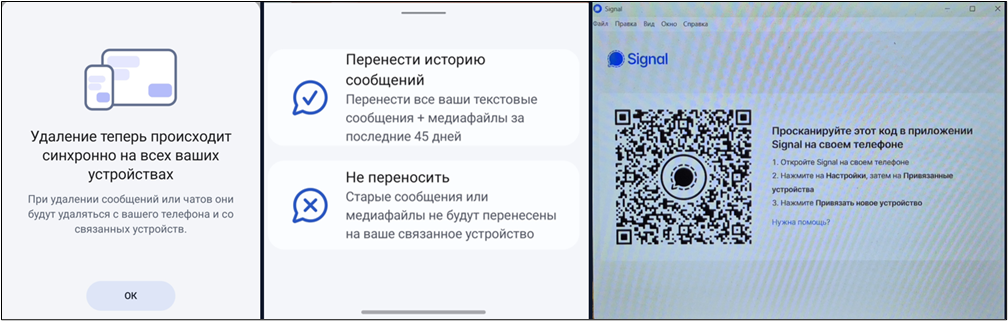
One of the key features of Signal Desktop is that during installation, the first launch of the program and authentication with a specific account, the user defines its settings: either to download the entire message history along with attachments (media files) for the last 45 days, or not to synchronize the existing data. This setting, chosen when the application is registered, affects what will ultimately be contained in the Signal Desktop database (Fig. 1).
When examining how Signal Desktop stores data, attention should be paid to its file structure. By default, the Signal Desktop data directory in MS Windows is located in the %AppData% system directory, is named Signal, and contains a number of internal subdirectories and service files (Fig. 2).
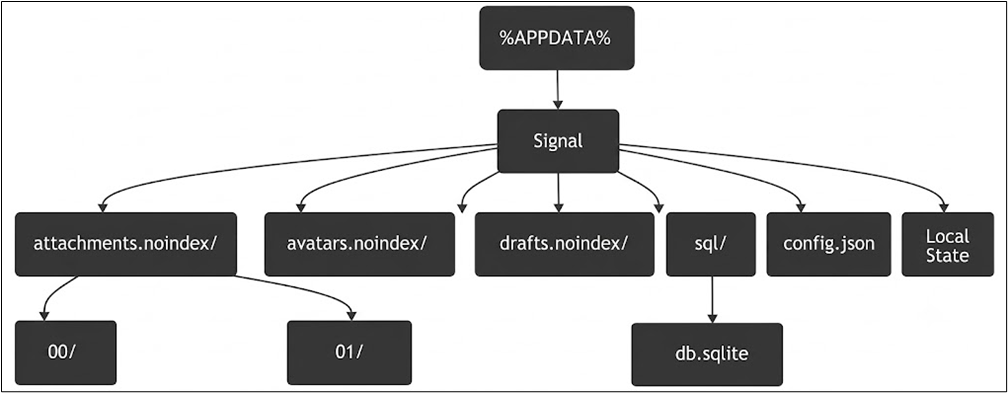
Briefly, its structure can be described as follows:
- db.sqlite — a file that is an SQLite database. It contains the main information about sent and received messages and about contacts. It has built-in SQLCipher cryptographic protection;
- attachments.noindex/ — a directory containing attachments (audio, photos, videos, documents). It is divided into subdirectories with hexadecimal names (00, 01, 0a, etc.);
- avatars.noindex/ — a directory containing the avatars of users and group chats;
- drafts.noindex/ — a directory containing message drafts;
- config.json — a configuration file containing the database encryption key;
- Local State — a service file containing an auxiliary key protected by the MS Windows DPAPI mechanism.
Encryption of the Signal Desktop database
As for the architecture of the Signal Desktop application, it is built on the Electron platform. The application uses an SQLite database with built-in SQLCipher encryption. In addition, the attachments sent and received by the user are encrypted separately.
SQLCipher is a specialized encryption extension for SQLite databases based on the AES-256 algorithm. It encrypts each page of the database individually. As a result of this process, the database file looks like an array of random binary data without any identifiers or signatures that would allow its format to be determined conclusively.
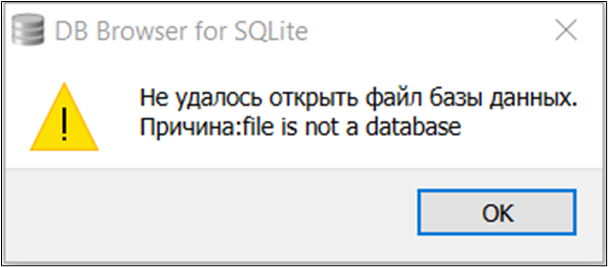
Ordinary software tools designed to work with SQLite do not support SQLCipher by default. To illustrate this, an attempt to open an SQLCipher database with DB Browser for SQLite and the resulting error message are shown (Fig. 3).
Obtaining the decryption key
Extracting information from database files in this format requires entirely different tools and approaches. We will consider one of them below.
To gain access, the version of DB Browser for SQLite designed to work with SQLCipher must be used. The tool is launched and the location of the database file is specified in the working window, after which a dialog box appears prompting for the decryption key (Fig. 4).
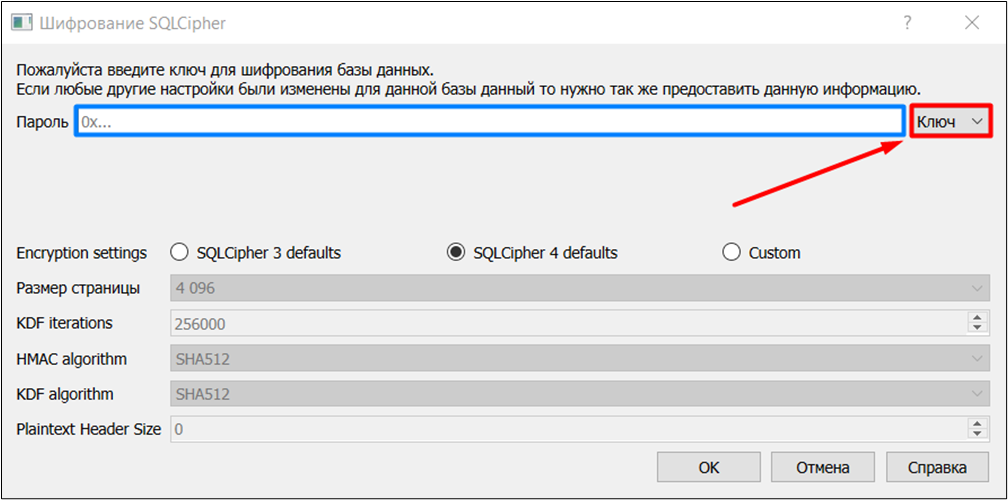
The database is decrypted by entering a password either in the form of a passphrase (which, as a rule, is user-generated) or as a decryption key in hexadecimal form (which, by contrast, is system-generated).
Given that the Signal Desktop database under consideration is encrypted immediately upon installation of the application packages and is protected by the MS Windows DPAPI mechanism, the decryption key is system-generated, and its value must be determined in order to gain access to the database contents.
To do this, it is necessary to examine the contents of the two service files mentioned earlier, located in the Signal Desktop application's data directory: Local State and config.json.
The Local State file
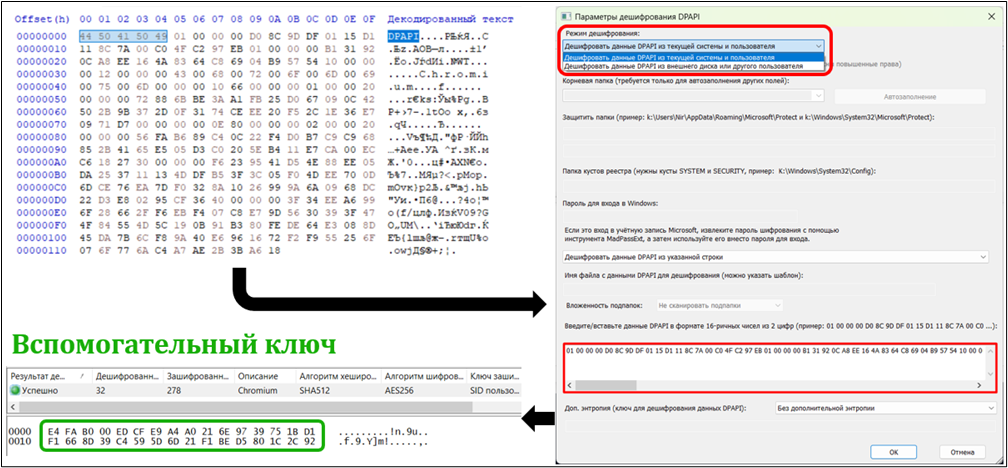
As noted earlier, the Local State file contains an auxiliary encryption key. By examining its contents, one can extract a base64-encoded string and decode it.
Next, the hex values corresponding to DPAPI should be discarded from the result, and the remaining hex values should be used as a string to compute the auxiliary key via the MS Windows DPAPI mechanism. For this we also use the open-source Nirsoft DataProtectionDecryptor utility. Decryption via the MS Windows DPAPI mechanism can be performed either on the running (current) system or on an external drive/mounted system. To access the MS Windows DPAPI mechanism, the system user's credentials (account and password) must first be established.
In doing so, the fundamental principles of handling digital information must be observed, namely ensuring its preservation and integrity. This requires the use of write blockers, the creation of copies of electronic storage media, and the use of virtual environments.
As a result of these operations, the value of the auxiliary encryption key is determined and stored in the workstation's RAM (Fig. 5).
The config.json file
To determine the decryption key, the contents of the config.json file, which contains the encryption key, must be examined. The key must be extracted; no additional conversion operations are required. The extracted key should then be analyzed in a hex editor (Fig. 6).
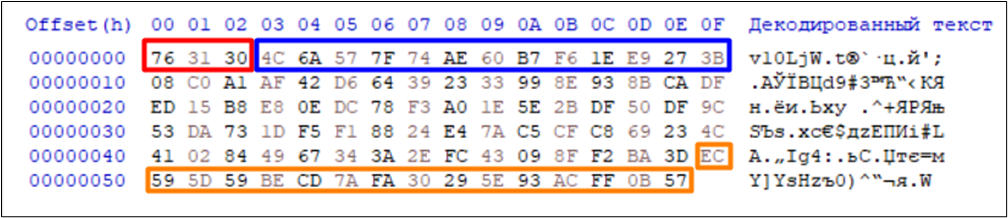
In the hex editor, four parameters need to be identified:
- the prefix (3 bytes, highlighted in red) — the version signature;
- the pseudorandom number (12 bytes following the prefix, highlighted in blue);
- the ciphertext (of variable length, located between the pseudorandom number and the authentication code) — the encrypted SQLCipher key;
- the authentication code (the last 16 bytes, highlighted in orange).
The general algorithm for obtaining the database decryption key is as follows: the pseudorandom number, ciphertext and authentication code values from the config.json file, together with the auxiliary key from the Local State file, are taken together and serve as the basis for an AES-256 transformation in Galois/Counter Mode (GCM).
Decrypting and analyzing the database
The transformation yields the decryption key, which provides access to the information contained in the SQLCipher-encrypted SQLite database of the Signal Desktop application (Fig. 7).
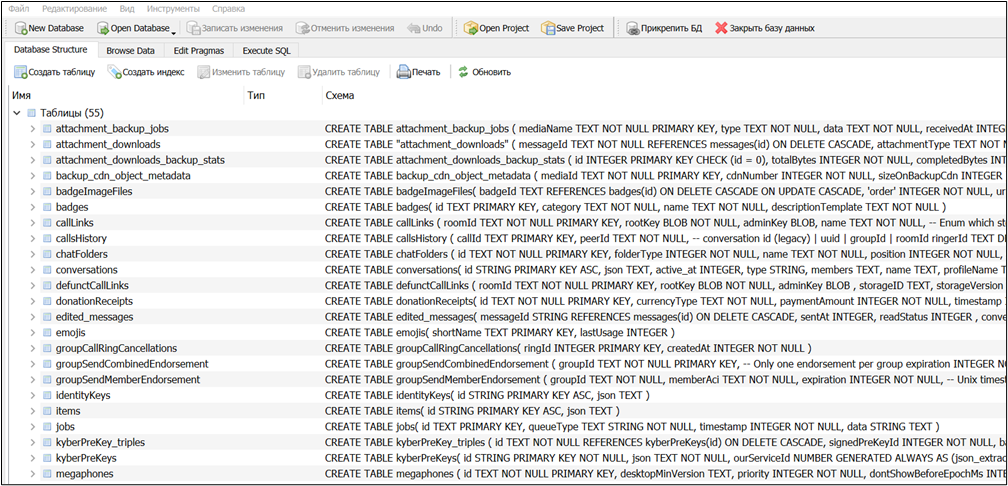
The db.sqlite database has the typical structure of a relational database consisting of tables with parameters and data. For example, the messages_fts_content table contains the texts of messages sent and received by the user. Message dates and times are, as is customary, stored in Unix Epoch format. There are also other tables, about 56 in total. A small selection of them is given below:
- items — user settings and identifiers;
- conversations — chat metadata (group and private);
- messages — message data;
- calls_history — call history (private and group);
- mentions — mentions in messages;
- reactions — emoji reactions to messages.
Each table contains a certain number of columns. In particular, the messages table contains about 44 data columns, including message and chat identifiers, the date and time of sending/receipt, information on the presence or absence of attachments, and others.
Decrypting attachments
The message_attachments table contains information about attachments and their type: video, image or text files, size in bytes, date and time of sending/receipt, chat identifier, and so on. As noted earlier, the attachments themselves are stored in encrypted form in the attachments.noindex directory, with each file encrypted with a separate key.
To decrypt attachments in Signal Desktop, the encryption keys must be determined one by one. To do this, the following parameters should be identified and extracted from the message_attachments table:
- size — the size of the attachment in bytes after decryption;
- contentType — the file format;
- path — the relative path to the encrypted attachment;
- plaintextHash — the SHA-256 hash of the decrypted file, base64-encoded, which is used to verify the integrity of the attachment after decryption;
- localKey — the encryption key, base64-encoded.
In the localKey value decoded from base64, which is 64 bytes in size, two parameters need to be identified (Fig. 8):
- the AES-256 key (highlighted in red) — the first 32 bytes of localKey;
- the initialization vector (highlighted in blue) — the last 16 bytes of localKey.

Next, the AES-256-CBC algorithm is applied to compute the decryption key for each attachment.
The general algorithm for obtaining the decryption key for each attachment in Signal Desktop is as follows: the size, plaintextHash and localKey values (the initialization vector and the AES-256 key), together with the file location and format, are taken together and serve as the basis for an AES-256 transformation in Cipher Block Chaining mode. After each attachment is decrypted, the service header — the first 16 bytes — must be removed from its structure. The size and hash of the resulting attachment file are then compared with the corresponding values in the database table. If they are identical, this indicates that the decryption process was successful.
Thus, this article has clearly demonstrated a working algorithm for gaining access to the information contained in the local database of the Signal Desktop application, which is encrypted with the SQLCipher extension and protected by MS Windows DPAPI, with separately encrypted attachments and their subsequent decryption. It should also be noted that this algorithm has limitations, one of which is the need to know the MS Windows user's credentials.
It is important to emphasize that in modern practice, it is not enough for specialists in digital forensics and computer forensic examination to rely solely on the output of automated software suites. A specialist must understand how data storage is organized and how access to the information contained in the objects of interest can be obtained. This makes it possible not only to rely on the results produced by specialized tools and services, but also, where necessary, to independently re-verify those results, confirming or refuting their reliability.