To many people, virtual Android devices are "toys" — something to play World of Tanks on or to farm likes with. But to forensic examiners, they are full-fledged guest operating systems that live on top of a hypervisor (QEMU/KVM, VirtualBox) or hide inside containers (LXC). And instead of fiddling with a guitar pick or a hot-air soldering station, we are dealing with a disk image file. Raw, qcow2, vmdk, vdi — they are legion, but the essence is the same: it isn't a NAND chip, just a chunk of data on the host machine.
And that, my friends, opens up new horizons for us... and new headaches (and sometimes the pain isn't confined to the head).
How virtual Android devices are used in criminal schemes
Beyond legitimate tasks (which is what the technology was designed for), the "villainous" ways of using emulators keep getting more sophisticated. See for yourself:
- Automated click fraud. Scripts built on adb shell input tap or Appium are run in parallel across dozens of emulators. Contraptions like these are a cast-iron giveaway in the logs (event.log, system.log): identical timing patterns between taps, accurate to the millisecond. A human, unlike a bot, doesn't click like that.
- Geolocation spoofing. Run adb shell settings put secure mock_location 1, plug in the coordinates — and an app that trusts the system location provider writes that GPS data into its own SQLite database (for example, in /data/data/com.google.android.gms/databases/). Everything looks clean, but the traces are there to be found (if you know where to look).
- Mass account registration with spoofed IMEI and Android ID. In an emulator, these identifiers live in settings.db (the secure table). They get changed via adb shell content update or directly in the image before launch. But the old values — inconveniently for them (read: conveniently for us) — often linger in logcat and in last_log; again, if you know where to look.
- Proxy chains. Emulators often route their traffic through SOCKS5 or HTTP proxies. The settings are stored in global.properties inside the image, and on the host — in /var/log/syslog or in iptables dumps.
In practice, this means we have to check not only the user apps but also the system logs, the properties, and the timestamps of input events. I recommend repeating this mantra often.
How virtual devices differ from real ones
Let's get to the juiciest part — how to tell an emulator from a "live" device without any special detectors.
Kernel and drivers
In a real phone, drivers talk to the hardware through interrupts and DMA. In an emulator, everything goes through the hypervisor. Hence the traces:
- /proc/cpuinfo — you'll see the hypervisor flag.
- dmesg — messages about virtio virtual buses.
- /sys/class/dmi/id/ — entries like Product Name: KVM or VirtualBox.
File system
- In an emulator, the block device is often called /dev/block/vda rather than the familiar mmcblk0. Check mount and fstab.
- The size of the system.img system partition may not (!) be a multiple of the physical eMMC block size — that's another marker.
- build.prop contains ro.kernel.qemu=1, ro.product.device=generic. Smart villains, of course, edit build.prop. But there is no such thing as a perfect crime. Secondary indicators remain: for example, the presence of /dev/qemu_pipe or /dev/virtio-ports/.
App behavior
Some apps check their environment themselves:
- The ro.kernel.qemu, ro.product.model and ro.hardware properties.
- The presence of files like fstab.goldfish.
- CPU architecture: if an app requires ARM and finds x86 instead, it may refuse to run.
- Missing sensors: a SensorManager call returns null or dummy data.
Tip: in logcat, at the DEBUG and WARN levels, many apps write something like Emulator detected or Running on virtual device. Find one of those, and you can go ahead and light a cigar.
How the various images differ from one another
There is no universal recipe: every emulator is a world of its own, with its own paths and formats. Let's run quickly through the main ones.
AVD (Android Virtual Device)
- Images: system.img, userdata.img, cache.img — raw ext4. They can be mounted on Linux with mount -o loop.
- Where they live: ~/.android/avd// — alongside config.ini, hardware-qemu.ini and the RAM snapshots (.snap or .img).
- Perk: the snapshots can be analyzed with Volatility and its Android plugin — you get access to the processes as they were at the moment of the snapshot.
BlueStacks
- Format: hybrid .vdi (VirtualBox) or .vhd. Path: C:\ProgramData\BlueStacks\Engine\ or ~/.bluestacks/.
- Quirk: user data lives in Data.vdi, system data in System.vdi. In some versions, Data.vdi is encrypted with an XOR key hard-coded into the emulator's executable.
- Artifacts: app installation logs are saved to %TEMP%\BlueStacksLogs\ on the host — a priceless source of intel on timing and actions.
NoxPlayer
- Format: VMDK or VHD. Lives in C:\Users\\AppData\Local\Nox\bin\BignoxVMS\.
- Perk: built-in root and a multi-instance manager. Each instance has its own settings.db and shared_prefs.
- Treasure trove: the Nox_share/ folder holds the files that were exchanged between the host and the emulator — documents, photos and evidence often turn up there.
LDPlayer
- Uses vmdk and Android 9. Notable for aggressive I/O optimization, as a result of which file timestamps (mtime, atime) are not always updated correctly. This anomaly can be used as an indicator of operation in a virtual environment.
Waydroid (the container approach)
- There is no separate disk image — the root filesystem is mounted via OverlayFS. App data in /var/lib/waydroid/data/ is part of the host filesystem. The artifacts are smeared in a thin layer across host and container. You need to analyze both sides.
Technical takeaway: before you start, always identify the emulator and its version. Paths, formats and mounting methods all depend on it. There is no universal script, but file and binwalk are your friends here.
The specifics of working with virtual images
Mounting
- raw/ext4: sudo mount -o loop,ro userdata.img /mnt/android_data
- qcow2: use qemu-nbd:
sudo modprobe nbd
sudo qemu-nbd --connect=/dev/nbd0 userdata.qcow2
- sudo mount /dev/nbd0p1 /mnt/
- vmdk: vmware-mount or, again, qemu-nbd.
- vdi (VirtualBox): VBoxManage clonehd or qemu-nbd.
- Proprietary (BlueStacks): convert first, or try qemu-nbd — provided the image isn't encrypted.
Important! Never mount with write access — read-only mode only. Otherwise you alter the timestamps and destroy all the evidence. It's like handling physical evidence with bare hands — simply unacceptable.
Encrypted BLOBs
Many E2EE apps (messengers) keep their keys in the KeyStore or in /data/misc/keystore/. On a real device they are protected by the TEE; in an emulator, by a software KeyStore. Often the master key sits right in keystore.db (SQLite) or in a .key file. Once you know it, you can decrypt the apps' databases. For WhatsApp, for instance, the key can be extracted if you have root (and in an emulator you always do). Like much else in forensics, this isn't hacking — it's working with a door that was left ajar =).
Recovering deleted data
In a virtual image, TRIM commands may never be executed, because the image is just a file on the host. As a result, deleted files often remain in unallocated areas. Run foremost, scalpel, photorec on the raw image — you'll pull out JPEGs, PDFs, SQLite fragments. And don't forget debugfs -R "ls -d" /dev/loop0 — it will show you the deleted inodes.
Snapshots and memory dumps
A RAM snapshot (.snap or .mem) is a gold mine. Run it through the linux_android plugin in Volatility 3. You'll get the running processes, network connections and open files. This is critical if the perpetrator used self-destructing messages — RAM may be the only place they survived.
Entity correlation
When there are dozens of emulators on a host, don't get stuck on each image in isolation. Analyze the host logs (/var/log/auth.log, ~/.bash_history) and the network connections. All the emulators may share a single egress IP (NAT), but their internal MAC addresses and Android IDs will differ. And in logcat -b events you can find the boot time of each instance — that will help synchronize the timelines. To simplify the correlation process, you can use MK Expert Plus (yes, yes, I work for the company that develops it — feel free to count this as a sponsored plug) or something similar: something that lets you create a single project, add the images of all the emulators plus the host logs, and have it build the cross-correlation itself, showing which events happened on which devices at the same time.
Comparison table: real vs. virtual
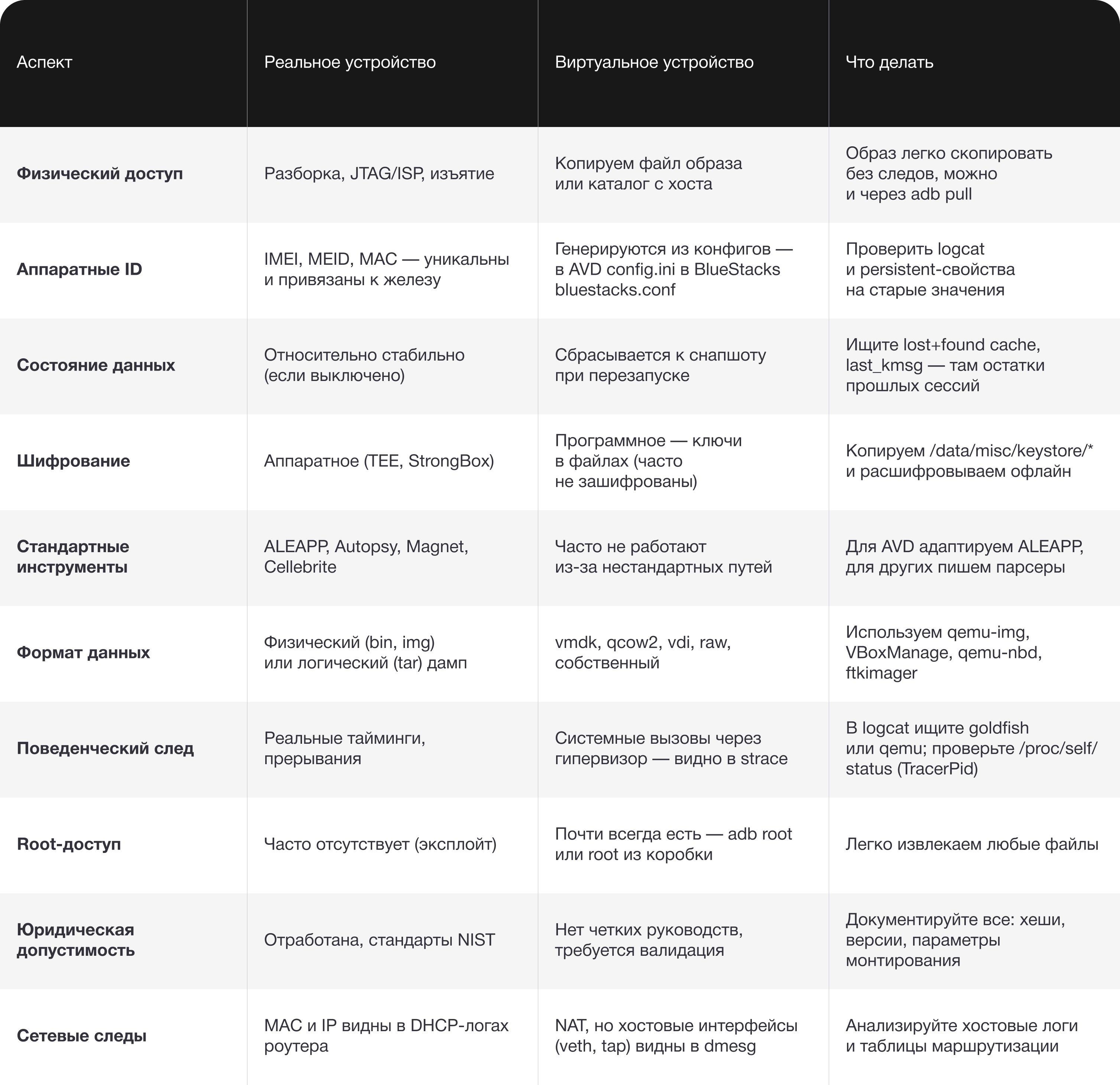
Case study: when the emulator speaks louder than words
Theory is all well and good, but let's look at a made-up (as always) example. You're not reading a manual, after all =)
The setup: the security team of a small bank. Their referral program had "gone off the rails" — someone was farming bonuses for referred clients. On the surface, everything looked clean: they passed identity verification, uploaded passport photos... But new accounts were being registered from different IPs a little too quickly — 10-15 registrations an hour, seven days a week. No human can keep that up, however hard they try. We suspected automation.
The first lead: the IP addresses were different, but they all belonged to the same cloud platform. I won't say what kind of magic got us access to the virtual machines (because I don't know — and the case is made up anyway =)), but we found one that was actively pumping traffic during the hours in question. It had BlueStacks installed. We start reaching for the cigar mentioned above.
What we did:
1. We copied the Data.vdi (user data) and System.vdi (system) images straight from the host, having stopped the emulator first. We took the hashes and documented the time.
2. We loaded both images into Mobile Criminalist (MKO Systems' "MK" forensic suite) — the tool automatically recognized the structure and parsed the system logs and user apps. Instead of mounting things by hand and hunting for databases, we got a ready-made timeline. In /data/data/com.bank.app/databases/ we found the app's SQLite database. Inside was a registrations table with GPS coordinates recorded for every session. The coordinates all hit the very same spot — a small park in central Moscow — even though the "clients" supposedly lived in different regions. This was mock location, pure and simple.
3. We pulled up the ADB logs (also in MK) — in logcat we found thousands of entries like
I/InputDispatcher: Delivering touch event to: com.bank.appD/Appium: tap at (350, 720) at 2025-02-10 03:14:23.456
The intervals between taps were exactly 500 ms, with no jitter whatsoever (apparently a bunch of Formula 1 drivers were holding a pedal-to-the-metal tapping contest).
4. But the juiciest part: we decided to take a look at the RAM snapshot the emulator had automatically saved on shutdown. We ran it through Volatility with the Android plugin and found, in memory, an active session token belonging to one of the "new clients". The token hadn't gone stale yet. A quick check showed that this account had already managed to withdraw its bonuses to a third-party wallet. We linked the transactions, and the chain closed.
5. The grand finale: in the host folder %TEMP%\BlueStacksLogs\ we found the installation logs for the app and the automation scripts, dated a month before the incident. And lying around in Nox_share/ (yes, there was a Nox on there too, as a backup) was a passwords.txt file with passwords for dozens of accounts — clearly prepared in advance.
The result: we not only confirmed the bonus farming but reconstructed the entire chronology, from the moment the emulator was installed to the withdrawal of the funds. The bank received a chronological timeline with timestamps, image hashes and log excerpts.
The story is made up; any resemblance, as always, is purely coincidental =)
The moral: virtual images are not faceless files. They store everything — coordinates, tap timings, even passwords, if the perpetrator was too lazy to delete them. The main thing is not to be afraid to dig deeper than "just looking through the folders". Analyze memory, cross-reference with the host logs, look for anomalies. Sometimes the emulator gives the attacker away completely, even when they think they're invisible.
In lieu of a conclusion
Forensics of virtual Android devices is a hybrid of mobile forensics, virtualization systems, file systems and cryptography. It is still in its formative stage, but the methods for AVD and the major emulators have already been worked out.
The main rule: don't apply the "real phone" template to an image. Approach each one individually, armed with qemu-nbd, debugfs, logcat and patience.
And remember: in real life, a criminal can't press Reset and restore a phone to factory settings in a second. In a virtual one, they can. But then, we know how to read logs and recover deleted inodes. Let this arms race continue — for us it only means more work and more interesting cases. Which means things won't get boring.